Everything You Need to
Protect Your Servers

Six integrated security modules working together to provide complete server protection, plus a growing set of fleet and threat-intelligence features. No configuration required — just install and forget.

Explore Modules ↓
New

Live Connection Map

See every service, outbound process and remote IP on your server in real time. Flags IPs near the DDoS limit, SYN floods and suspicious outbound ports, and blocks them in one click.

Active Connections · Dashboard widget

Login Failure Daemon

Monitors authentication logs across 20+ services in real time. Automatically blocks brute force attackers before they compromise accounts.

SSHD, FTP, SMTP, IMAP, cPanel & more

Dynamic Firewall

Production-ready nftables/iptables firewall with secure-by-default port settings. Easy customization through the configuration file.

IPv4 + IPv6 · Auto port discovery

DDoS Mitigation

Connection-based DoS protection at L3/L4 with per-IP connection limits, port flood detection, and ICMP rate limiting.

Per-IP limits · Cloudflare API

Alerting & Notifications

Configurable per-event-type email alerts with custom templates and external script hooks.

Email

Intrusion Detection

Detects port scans, exploit attempts, and suspicious processes. Regex-based pattern matching identifies known attack signatures.

Port scan · Exploit · Process monitoring

Account Hardening

Alerts on new account creation, monitors file integrity, and detects deleted-binary processes across all accounts.

File integrity · Policy enforcement

Country & ASN Blocking

Deny or allow whole countries or networks (AS numbers) with CC_DENY and CC_ALLOW. Zone data refreshes automatically.

GeoIP · ASN prefixes · Auto refresh

Security Check

A guided checklist of the essentials — allow your own IP, keep SSH and panel ports open, start the firewall, set alerts — each with a one-click fix.

Dashboard progress · seclayer --security-check

More Ways to Stay Protected

Recent additions that make SecLayer easier to set up, easier to run across many servers, and harder to get past.

One-Command CSF Migration

Moves your CSF allow/deny/ignore lists, ignore files and settings to SecLayer, then disables CSF and starts SecLayer. CSF itself is never uninstalled.

seclayer --csfmigrate

IP Blocklists

Subscribe to public threat-intelligence feeds and keep them loaded into the firewall, refreshed on their own schedule.

Feeds · ipset-backed · Auto refresh

Cluster Ban Sync

Ban or allow an IP on one server and every peer in the group applies it too. Messages are signed with a shared key.

Multi-server · HMAC-signed

Global Allow & Deny Lists

Keep one central allow or deny list at a URL and have every server pull it in — manage a fleet from one file.

GLOBAL_ALLOW · GLOBAL_DENY

Cloudflare Integration

Blocks are also pushed to Cloudflare IP Access Rules, so attackers are stopped at the edge using their real visitor IP.

Cloudflare API

RBL Check & Reports

Check your server IPs against major DNS blocklists on demand, or get an hourly, daily, weekly or monthly email report.

Scheduled email reports

Port Knocking & Flood Limits

Hide services behind a port-knock sequence and rate-limit SYN, UDP and per-port floods with connection limits.

PORTKNOCKING · SYNFLOOD · CONNLIMIT

Server Statistics

Collected history for system load, disk, MySQL and Apache, so you can see what was happening when an alert fired.

Charts in the admin panel

Live & Search Logs

Tail logs live or search across them for an IP or pattern straight from the admin panel — no SSH session needed.

Live tail · Log search

Signed Updates

Every update package is signature-verified before it is installed, so only genuine SecLayer releases are applied.

Signature verification

17 Languages & Dark Mode

The whole interface is translated into 17 languages and follows your control panel language by default. Switch between light and dark themes in one click.

Header language menu · Theme toggle

Paged Lists & CSV Export

Allow, deny, temporary ban and DDoS lists are paged for large servers, support bulk removal, and export to CSV in one click.

Entries per page · Export CSV

How Each Module Protects You

Detailed breakdown of every component in the SecLayer security stack.

Visibility

Live Connection Map

See every connection on your server as it happens. An animated map shows which remote IPs connect to your services, where your own processes connect out to, and which IPs need attention, with one-click blocking right from the map.

  • Services, outbound processes and remote IPs with country flags, refreshed every few seconds
  • Flags IPs near the DDoS limit, SYN floods and blocked IPs that are still connected
  • Detects processes talking to mining, spam or IRC ports
  • IP details with reverse DNS, DDoS limit gauge and every flow, then Block or Allow
  • Top 10 / 15 / 25 view and subnet grouping for servers with thousands of connections
DDoS Protection › Active Connections
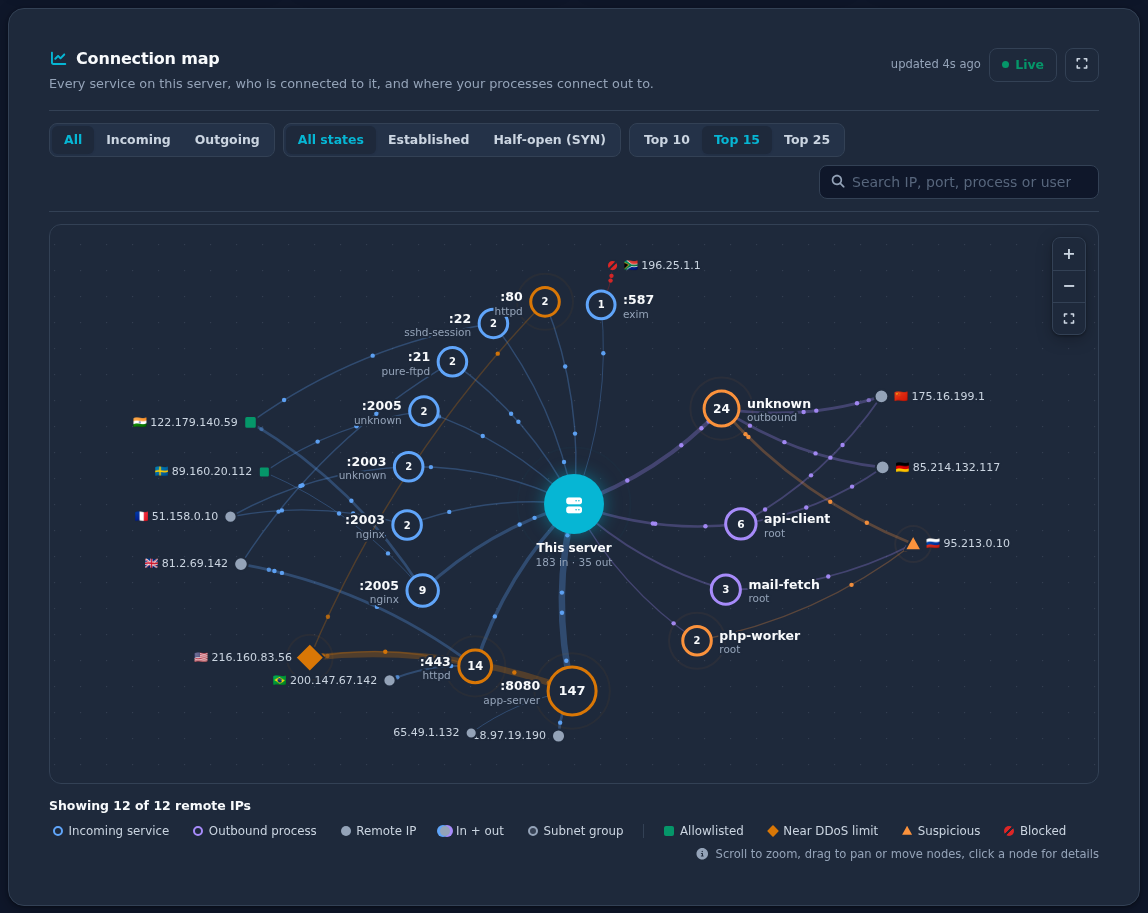
SecLayer live connection map
Core Engine

Login Failure Daemon (LFD)

The heart of SecLayer. LFD continuously monitors system authentication logs and tracks failed login attempts by IP. When thresholds are exceeded, offenders are automatically blocked at the firewall level — no human intervention required.

  • Real-time log monitoring on all configured log files
  • Per-service tracking: SSH, FTP, SMTP, POP3, IMAP, cPanel, Webmail
  • Configurable thresholds, block durations, and permanent lists
  • Automatic cleanup with graduated blocking for repeat offenders
  • PTR lookup with regex pattern matching on offending IPs
LFD Activity
[14:32:01] LF_SSHD: 203.0.113.42 — 12 failures in 60s [14:32:01] BLOCKED: 203.0.113.42 added to nftables/iptables [14:31:45] LF_FTPD: 198.51.100.17 — 8 failures [14:31:05] Monitoring: 12 active connections on port 22
Firewall Status
Chain INPUT (policy DROP) ACCEPT tcp -- 0.0.0.0/0 tcp dpt:22 ACCEPT tcp -- 0.0.0.0/0 tcp dpt:80 DROP all -- 203.0.113.42 DROP all -- 198.51.100.17
Network Layer

Dynamic Firewall Management

Automatically discovers open ports and generates precise nftables/iptables rules. No manual rule writing — the firewall configures itself based on your running services.

  • Full IPv4 and IPv6 with stateful connection tracking
  • Custom allow, deny, and ignore lists for IPs and ports
  • SYN flood protection via configurable connection thresholds
Attack Surface

Multi-Layer DDoS Protection

The DDoS daemon monitors connection rates and applies per-IP limits automatically. Port flood detection and ICMP rate limiting protect against volumetric attacks at the network layer.

  • SYN flood detection via port-based connection limits
  • Per-IP connection tracking with permanent block for repeat offenders
  • ICMP flood protection
  • Cloudflare API integration for edge-level protection
seclayer.conf
# /etc/seclayer/seclayer.conf DDOS_ENABLE="1" DDOS_INTERVAL="60" DDOS_CONNECTION_LIMIT="150" DDOS_BAN_PERIOD="600" DDOS_ENABLE_PORTS="1" DDOS_PORT_CONNECTIONS="80:150:600 443:150:600"

Works With Your Control Panel

Native integration with every major hosting platform. Features activate automatically when detected during installation.

cPanel / WHM

Fully Supported

DirectAdmin

Coming Soon

Plesk

Coming Soon

InterWorx

Coming Soon

CWP

Coming Soon

Contact SecLayer

For sales and technical support, reach out to us

Email Now →